Penny: where her tips come from and why she does not use AI
The little coin with a face in the corner of the screen is more than a mascot. Every day Penny looks through your spending and suggests where you can save. Here is how she works, what she can spot and why your data never leaves your device.

Penny lives in the top right corner of every tab. When she has something new for you, she blinks and shows a tip counter. Click her and a speech bubble with a tip opens.
How Penny works
Penny is not artificial intelligence and does not send your data anywhere – not to us, not to any company. She is a set of about twenty simple, transparent rules that run entirely in your browser. Each rule checks one thing: for example, whether you are spending in a category faster than usual, whether a budget is close to its limit or whether you have a payment that looks like a subscription.
Why this approach rather than "AI"?
- Privacy. Your finances are your business. The rules run locally, even without internet.
- Predictability. Every tip is based on concrete numbers from your data – not "made-up" text.
- Speed. Tips appear instantly, without waiting for a server.
Penny picks the most important tips from those available and shows them one by one. At the end you can click "Thanks, see you tomorrow 💤" – she then goes to sleep and comes back the next day with new observations. If you miss her, you can wake her up earlier.
What she can spot
Here are examples of situations in which Penny will speak up:
Spending pace
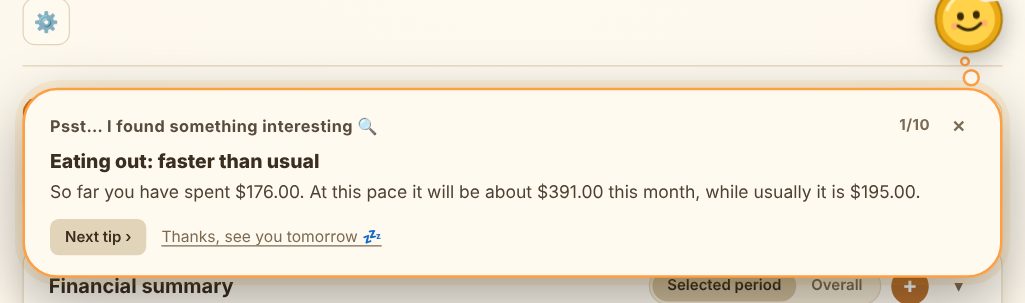
- "Eating out: faster than usual" – when you are spending clearly faster than average in a category this month. Penny shows how much you have spent so far, how much it will be at this pace by the end of the month and how much you usually spend.
- "Well done! … down" – it works the other way too: she will praise you when a category is going better than usual.
- "Watch the end of the month" – when, at the current pace, spending will exceed income.
- "Weekends cost the most" – when a large share of your spending falls on Saturdays and Sundays.
Budgets
- "Budget … is melting" – when a budget is almost used up in the middle of the month.
- "Budget … exceeded" – with how many days are left until the end of the month.
Recurring payments and subscriptions
- "This looks like a subscription" – when the same amount appears every month. Penny converts it into a yearly cost and asks whether you still use it.
- "Recurring payment" – she suggests adding a repeating bill to your recurring payments so you do not have to enter it by hand.
- "Bills are …% of income" – when fixed costs eat a large part of your income.
Goals and saving
- "Time for an emergency fund?" – when you do not have any savings goal yet.
- "… came in 💰" – after payday she suggests putting 10% towards a goal first.
- "Goal … sooner?" – she calculates how much faster you would reach a goal by cutting your most frequent small expense.
- "Goal … needs a plan" – she encourages regular, smaller deposits instead of occasional large ones.
Keeping your data tidy
- "No new entries for … days" – a reminder to add your receipts before you forget them.
- "Big expense" – she flags a single expense that is far from your usual amounts.
- Last month's summary – income, spending and balance in one sentence.
What Penny does not do
Penny does not guess and does not judge. She does not predict exchange rates, does not recommend specific financial products and knows nothing beyond what you enter yourself. Her tips are suggestions based on your numbers – the decision is always yours.
She also tries not to confuse things that do not change with real spending. Rent or a loan repayment will not be treated as "spending that is growing too fast", and deposits to savings goals are not counted as spending.
How to get better tips
Penny is only as good as the data she gets:
- Record expenses regularly. Most rules need a few weeks of history to compare "now" with "usual".
- Use categories consistently. If you file lunch as "Groceries" one day and "Eating out" the next, comparisons will be less accurate.
- Add budgets and goals. Then Penny has something to measure your spending against.
- Enter fixed bills as recurring payments. That way she will not confuse bills with day-to-day spending.
Penny outside the tracker
Penny is also present in the Home, News and Guides tabs, but she does not show tips there – she just says hello now and then and invites you to the tracker. Tips about your finances appear only in the 💰 tracker tab.