Your data in Money Trackrr: backups, a new phone and installing it like an app
Money Trackrr has no server holding your data – everything is stored in your browser. That is great for privacy, but it needs one habit: backups. Here is how to make one, how to move your data to another device and how to install Money Trackrr on your phone.

Where your data lives
When you save a transaction, it goes into your browser's storage on your device (so-called localStorage). We do not send it to any server, we have no access to it and we cannot recover it. Thanks to that:
- nobody but you sees your finances,
- the app works without internet – you can add an expense on a plane or in a basement with no signal,
- you do not need an account or a password.
There are three consequences worth knowing, though:
- Your data belongs to one browser on one device. Chrome on your laptop and Safari on your phone are two separate "safes".
- Clearing your browser data also deletes your Money Trackrr data. This applies to "clear history and site data", some "cleaner" programs and incognito mode (where data disappears when you close the window).
- Your data is tied to the website address. If you open Money Trackrr at a different address, you will see an empty app – while your data is still waiting at the previous address.
There is one solution to all three: a backup.
How to make a backup
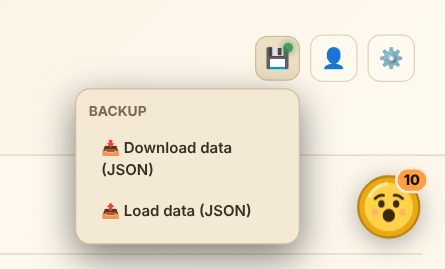
- Click the floppy disk icon 💾 in the top right corner.
- Choose "📥 Download data (JSON)".
- Your browser saves a backup file – usually in your "Downloads" folder.
The file contains all your data: transactions, recurring payments, categories, budgets, goals, accounts, transfers and settings. Keep it somewhere safe – in cloud storage, in an e-mail to yourself or on a USB stick.
The green dot next to the floppy disk means your data is saved locally. If more than two weeks pass since your last backup, Money Trackrr reminds you with a separate bar and a "Download backup" button.
How often? A good rule: once a week, or always after a bigger change (such as importing a bank statement or converting your currency). Downloading a backup takes 5 seconds.
How to restore your data or move it to another device
- On the new device (or in the new browser) open Money Trackrr.
- Move the backup file there – by e-mail, cloud storage or cable.
- Click 💾 → "📤 Load data (JSON)" and choose the file.
Done – after a moment you will see all your transactions, budgets and goals.
Note: loading a backup replaces the data in that browser rather than merging it. If you have already entered something on the new device, download a separate backup from it first, or re-enter those transactions after loading.
Install Money Trackrr on your phone
Money Trackrr is a so-called PWA – a website you can "install" like a regular app. You get an icon on your home screen, a full screen without the browser bar and offline use. No app store download needed.
Android (Chrome):
- Open Money Trackrr in Chrome.
- Tap the ⋮ menu in the top right corner.
- Choose "Install app" or "Add to Home screen".
iPhone and iPad (Safari):
- Open Money Trackrr in Safari.
- Tap the Share button (a square with an arrow).
- Choose "Add to Home Screen".
Computer (Chrome, Edge): if your browser allows it, a 📲 button appears in the Money Trackrr header – click it to install the app. You can also use the install icon in the address bar.
Remember: the installed app uses the data of the same browser you installed it from. If you used Money Trackrr in a different browser before, move your data with a backup.
Updates
You do not need to update anything manually. When you are online, Money Trackrr fetches the latest version by itself, and we announce what is new in the updates section on the home page. Your data stays untouched.
What about accounts and sync?
We are working on optional accounts that will sync your data automatically between your phone and computer. Optional – because Money Trackrr will always work without an account and without internet too. Until then, a backup is the simplest and safest way to move your data.
In short
- Your data is only in your browser – nobody else sees it, but nobody can recover it either.
- 💾 → "Download data (JSON)" – a backup in 5 seconds. Do it weekly.
- 💾 → "Load data (JSON)" – restore or move to another device (replaces current data).
- On your phone, add Money Trackrr to your home screen – it works like an app, offline too.